Why Ctrl+C Terminates Your Programs in the Terminal?
Ctrl+C isn’t magic — it’s a signal (literally) telling your program to stop. Here’s how it actually works.
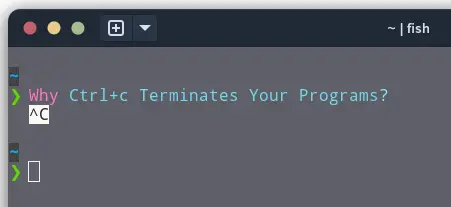
If you're a developer working with Node.js, React, or Spring Boot, you spend a lot of time in the terminal running servers, scripts, or builds. When a process needs to be terminated, you press Ctrl+C. But why does this key combination actually kill the process from the terminal?
Signals: The Terminal's Way of Talking to Programs
Unix-like operating systems use signals to communicate with running processes. A signal is a small message sent to a process, telling it that something happened - like a user request or an internal system event.
Pressing Ctrl+C doesn't just "stop" the program - it sends a signal called SIGINT (Signal Interrupt) to the process.
- SIGINT is number 2 in the signal list.
- Its default behavior is to terminate the program, although programs can override it and handle it gracefully.
So when you hit Ctrl+C, the terminal is politely saying, "Hey, process, stop what you're doing!" Most programs respond by terminating immediately.
Understanding SIGINT and Other Signals
Signals are defined in the signal.h header file, and each has a specific number. Here are some of the most common signals:
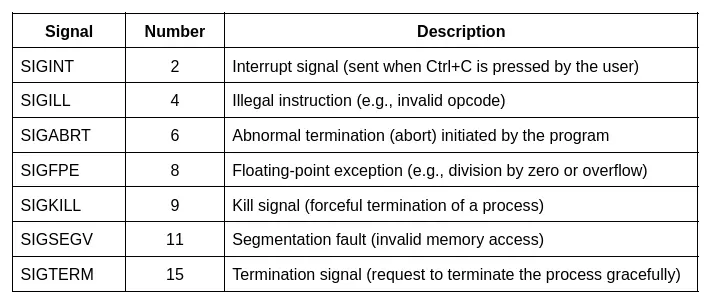
Most signals can be caught or ignored by a program. However, SIGKILL and SIGSTOP cannot be intercepted or ignored - they immediately take effect.
When Ctrl+C Doesn't Work: Using kill -9
Sometimes, when you have multiple terminals open, a process may still be running in the background even after you thought you closed it. This often results in errors like:
Error: Port 8080 is already in use
In such cases, Ctrl+C won't help because the process occupying the port is detached from your current terminal session. To resolve this, you can forcefully terminate the process using:
lsof -i :8080        # Find the process using port 8080
kill -9 <processId>  # Force kill it
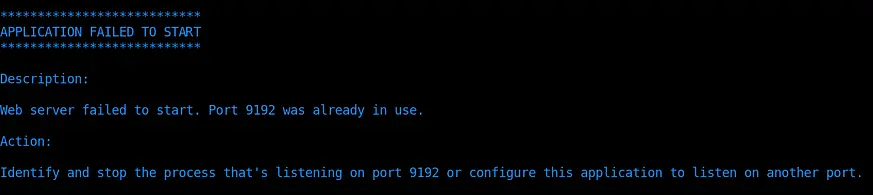
In the below picture, I'm trying to start the application but it says Port 9192 is already in use and tells me to "either stop the process or listen on another port".
To kill the process on port 9192, first I identify the PID and then use kill cmd to terminate the process and free up the port 9192.
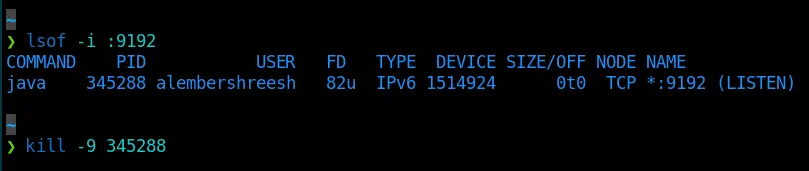
This sends SIGKILL (signal 9), which immediately stops the process. Unlike SIGINT or SIGTERM, the program has no chance to clean up, so use this method only when necessary to free up the port.
Why Some Programs Don't Respond to Ctrl+C
Not all programs respond to Ctrl+C as expected. Some applications, especially those running in the background or within certain environments (like vi/vim - terminal based text editor), may not immediately terminate upon receiving SIGINT. This behavior can be due to:
- The program overriding the default SIGINT handler.
- The terminal not sending the signal to the correct process.
- The process being in a state that doesn't handle signals promptly.
In such cases, you can use Ctrl+Z to suspend the process and then use the kill command to terminate it.
TL;DR
- Ctrl+C = SIGINT (2) → politely asks the process to terminate.
- kill -9 = SIGKILL (9) → forces termination, no chance for cleanup.
- Most signals can be handled, but SIGKILL and SIGSTOP cannot.
- Use lsof -i :PORT + kill -9 to free up stuck ports like 8080.
Understanding signals gives you insight into how programs interact with the OS. For a deeper dive into signals, process management, and core dumps, check out the Core Dumped YouTube Channel. He explain these concepts with practical examples in a very approachable way.